Fiber:协作式调度
摘要用一份可运行的最小实现复盘 Fiber 的协作式调度:如何把深度优先遍历拆成可暂停、可恢复、最终统一提交的工作单元。
Fiber 很容易被讲成一堆名词。我更想把它缩成一份能跑的小实现:从 JSX 出发,先造出 DOM,再把一次跑到底的遍历拆开。这不是 React 源码复刻,只保留理解 Fiber 必须的那条主线。Talk is cheap, show me the code。
JSX 转虚拟 DOM
先定一段有几层嵌套、但还能一眼看完的业务代码:
function App() {
    return(
        <ul>
            <li>
                1
                <ul>
                    <li>2</li>
                    <li>3</li>
                    <li>4</li>
                </ul>
            </li>
            <li>
                5
                <ul>
                    <li>6</li>
                    <li>7</li>
                    <li>8</li>
                </ul>
            </li>
            <li>9</li>
        </ul>
    );
}
自动 JSX runtime 会把 App 函数里的 JSX 编译成从 react/jsx-runtime 导入的 jsx、jsxs 调用;classic runtime 则会生成 React.createElement。这一步只负责语法转换,不会建立 FiberTree,也不会在编译时执行 App。
为了让后面的遍历代码保持简单,我手工把 App() 的结果归一化成一棵 demo vnode。它只借用了 type / props / children 这几个概念,不是 Babel 输出,也不是 React element 或 Fiber 的真实内部结构:
const vnode = {
  type: "ul",
  props: {
    children: [
      {
        type: "li",
        props: {
          children: [
            "1",
            {
              type: "ul",
              props: {
                children: [
                  {
                    type: "li",
                    props: { children: "2" },
                  },
                  {
                    type: "li",
                    props: { children: "3" },
                  },
                  {
                    type: "li",
                    props: { children: "4" },
                  },
                ],
              },
            },
          ],
        },
      },
      {
        type: "li",
        props: {
          children: [
            "5",
            {
              type: "ul",
              props: {
                children: [
                  {
                    type: "li",
                    props: { children: "6" },
                  },
                  {
                    type: "li",
                    props: { children: "7" },
                  },
                  {
                    type: "li",
                    props: { children: "8" },
                  },
                ],
              },
            },
          ],
        },
      },
      { type: "li", props: { children: "9" } },
    ],
  },
};
JSX 的实际编译结果可以直接在 Babel REPL 里看:
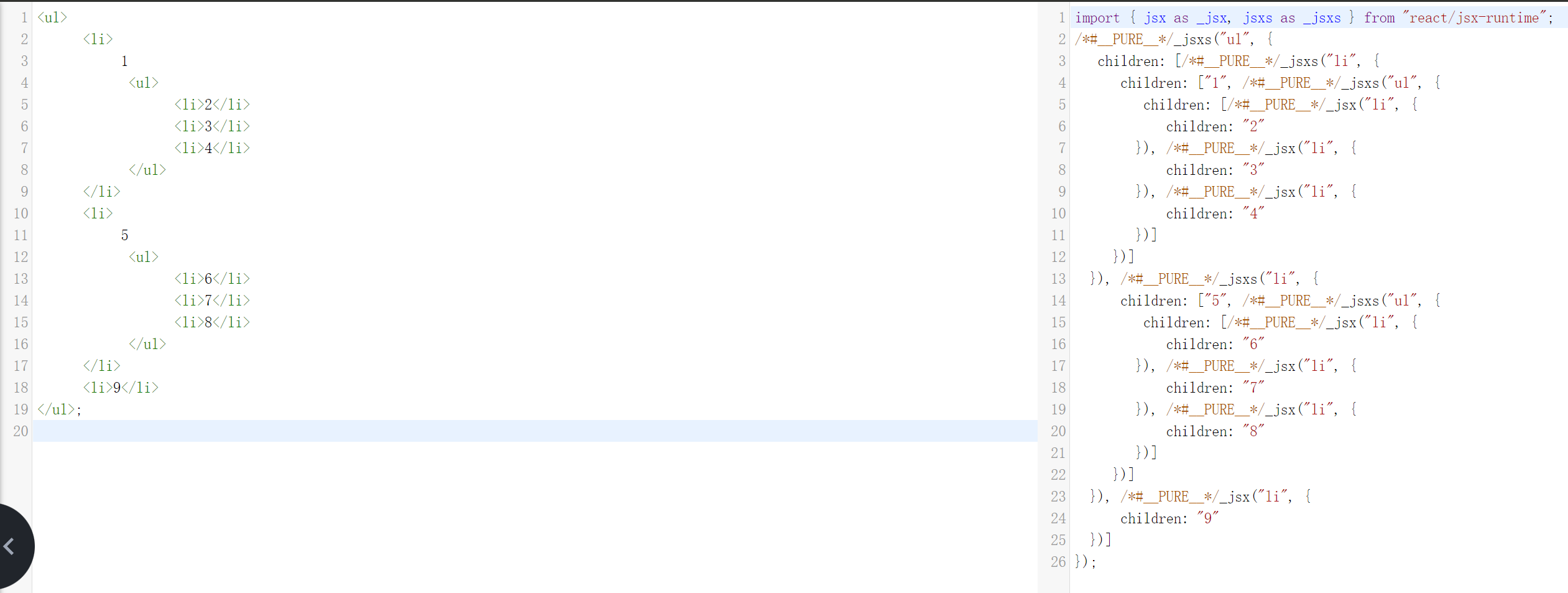
jsx/jsxs 会创建 element 描述;组件函数要等到 render 时才会执行。本文跳过这层运行时细节,直接使用上面的手工 vnode 作为遍历输入。
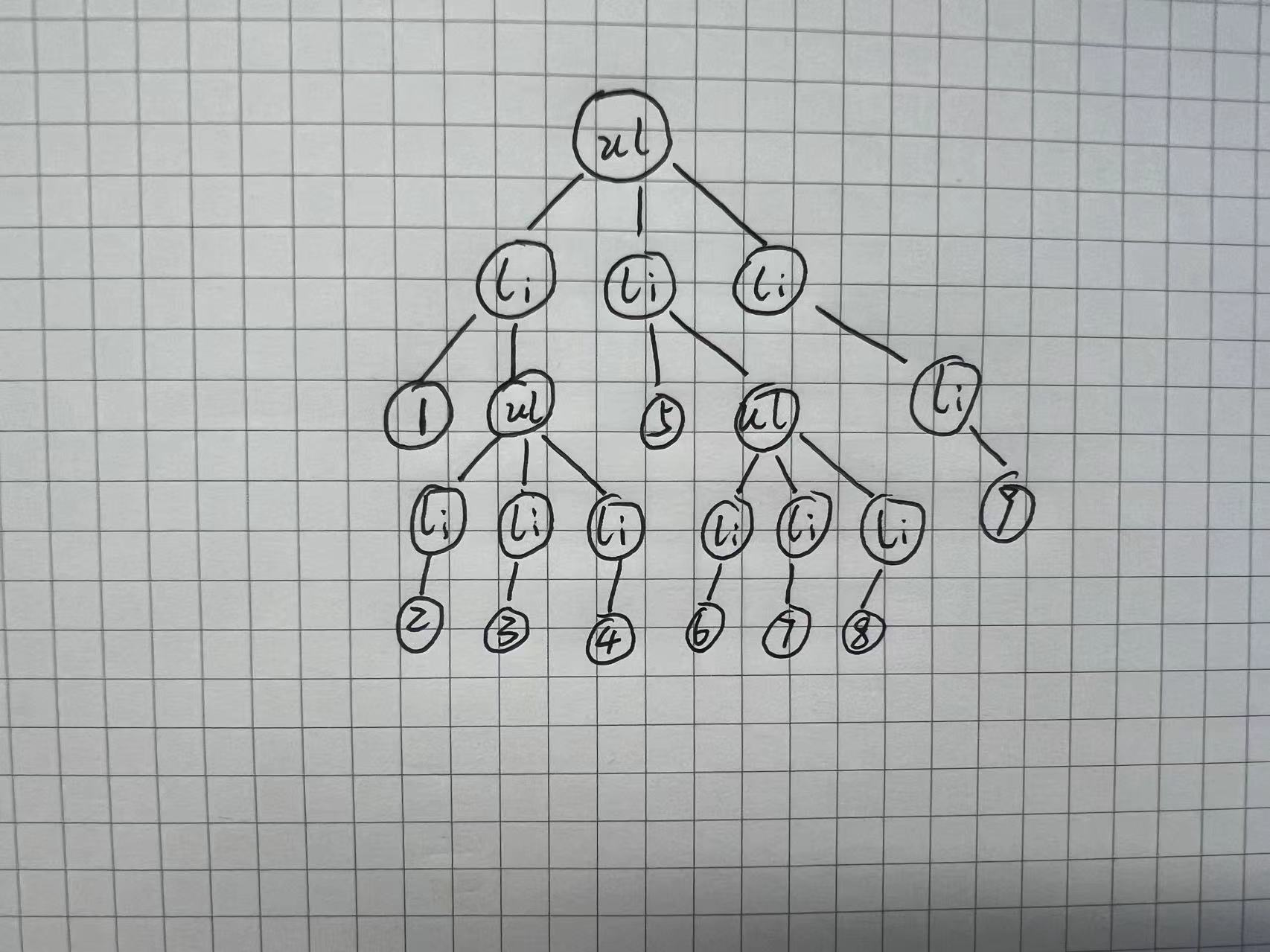
先用一次 DFS 跑完
先不管 Fiber。拿到这棵树以后,一次 DFS 就能把它变成真实 DOM:
function createDomElement(vnode) {
  // 创建元素节点
  const element = document.createElement(vnode.type);

  // 如果有子节点,递归处理每个子节点
  const children = vnode.props.children;
  if (Array.isArray(children)) {
    children.forEach(child => {
      if (typeof child === 'object') {
        element.appendChild(createDomElement(child));  // 对象表示子元素节点
      } else if (typeof child === 'string') {
        element.appendChild(document.createTextNode(child));  // 字符串表示文本节点
      }
    });
  } else if (typeof children === 'string') {
    element.appendChild(document.createTextNode(children));
  }

  // 返回构建好的 DOM 元素
  return element;
}

// 获取根节点
const root = document.querySelector("#root");

// 清空原有内容
root.innerHTML = '';

// 创建 DOM 并挂载
const realDom = createDomElement(vnode);
root.appendChild(realDom);
到这里,一个只支持首次挂载的声明式 UI 雏形已经出来了。它还没有属性和事件更新、组件状态、diff、生命周期等机制;这里只继续处理“深度优先遍历会长时间占住主线程”这一件事。
Fiber
上面的 DFS 有个硬伤:它一旦开始就会跑到底。虚拟 DOM 足够大时,主线程一直被占着,交互只能等。要中途让出主线程,需要解决两件事:把大遍历拆成小任务,以及在恢复时知道下一步去哪里。
这里把一个 Fiber 当作最小的工作单元。原先的 vnode 只有父结点持有 children,对可暂停的遍历不够用。比如组件挂载按后序遍历触发 componentDidMount,“结点 1”处理完后,它得能找回父结点,再继续兄弟分支。 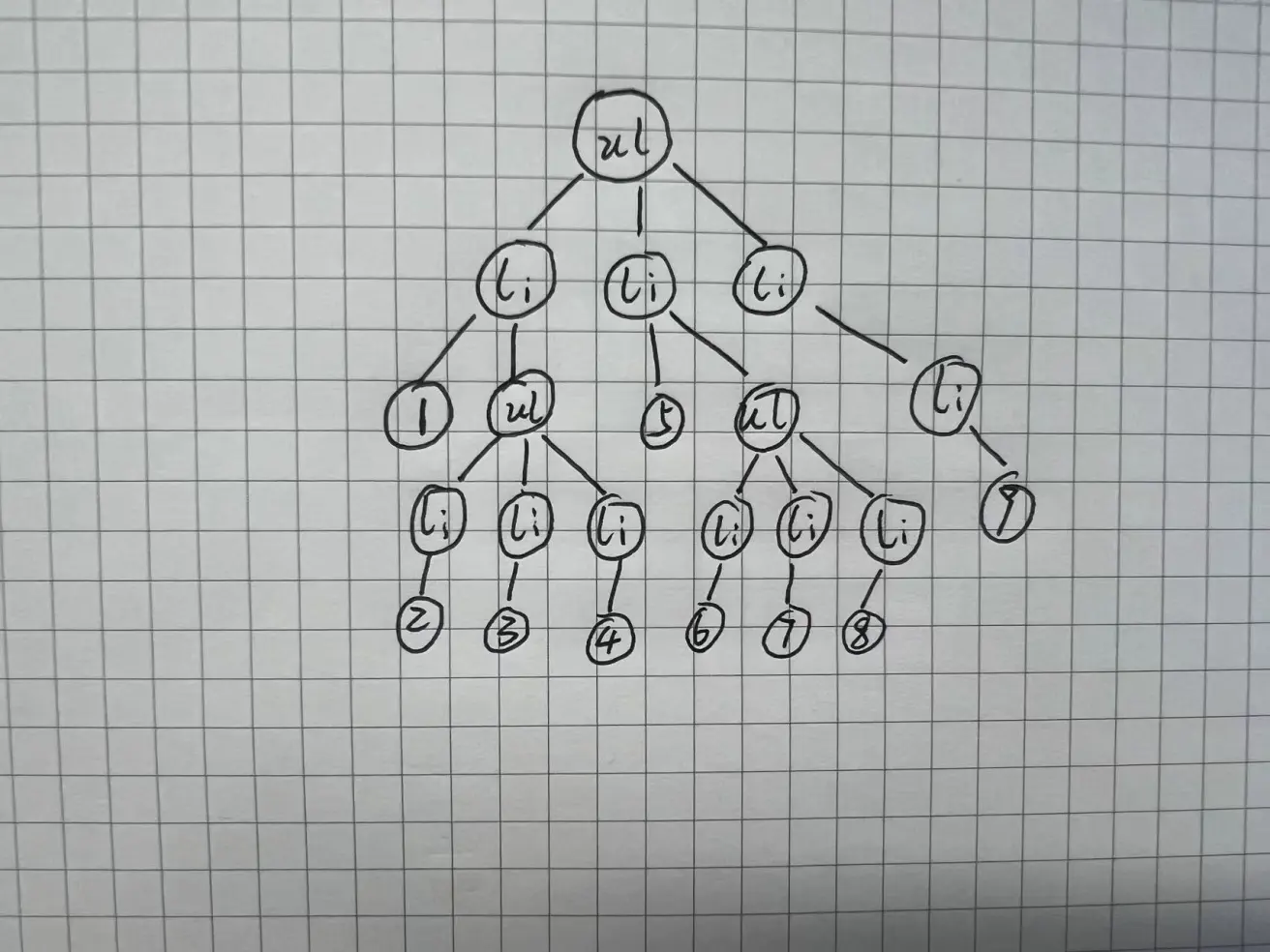
我给每个结点加三个指针: 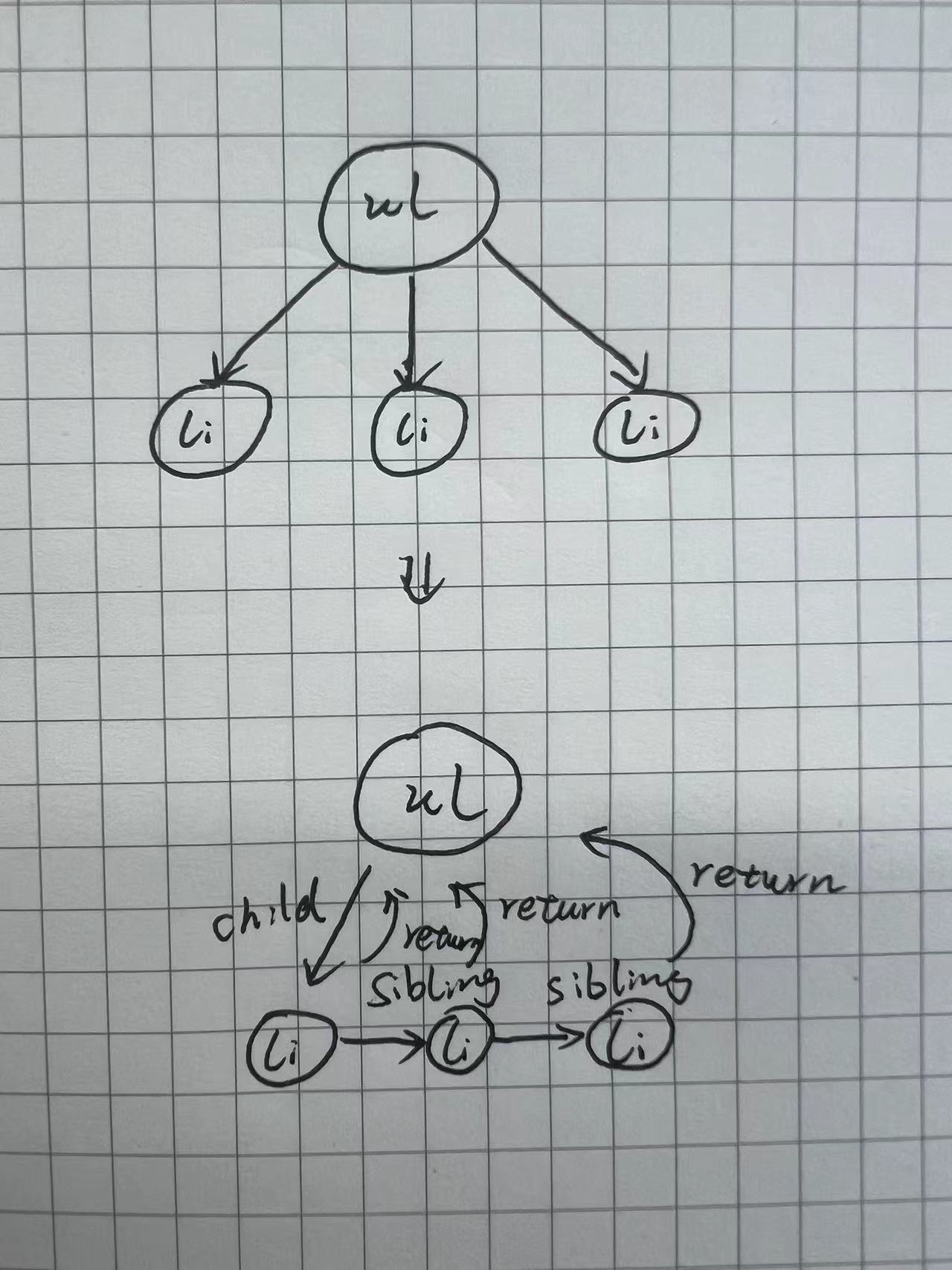
- child 第一个孩子结点
- sibling 相邻的右兄弟结点
- return 父结点
还是深度优先,只是这次每处理一个结点就把下一个结点返回:
function performUnitOfWork(fiber) {
    let children = fiber.props.children || [];
    let previousSibling = null;

    // 仅当非文本节点时处理子节点
    if (fiber.type !== "txt") {
        for (let i = 0; i < children.length; i++) {
            let child = children[i];

            let newFiber = {
                type: typeof child === "string" ? "txt" : child.type,
                props:
                    typeof child === "string"
                        ? { nodeValue: child }
                        : child.props || {},
                child: null,
                sibling: null,
                return: fiber,
                stateNode: null,
                effectTag: "PLACEMENT"
            };

            if (i === 0) {
                fiber.child = newFiber;
            } else {
                previousSibling.sibling = newFiber;
            }
            previousSibling = newFiber;
        }
    }

    // 继续深度优先遍历
    if (fiber.child) {
        return fiber.child;
    }

    let nextFiber = fiber;
    while (nextFiber) {
        if (nextFiber.sibling) {
            return nextFiber.sibling;
        }
        nextFiber = nextFiber.return;
    }

    return null;
}
这段代码一边补齐 child / sibling / return,一边返回下一个工作单元。走到叶子后,先找兄弟;没有兄弟就沿 return 往上找。现场就在这三个指针里,不需要靠 JS 调用栈把整次递归压住。
这三个指针最容易在代码里看懂、合上文章又忘掉。下面把它们变成一棵可以单步执行的 FiberTree。每点一次,只处理一个结点;把“每帧预算”调小,再按“执行一个时间片”,就能看到遍历如何在任意结点暂停,下一帧从现场继续。
动手实验 · 约 30 秒
沿着 child / sibling / return 走一遍
橙色是当前工作单元,深色已经完成,虚线仍在等待。
下一个工作单元是 root。它有 child,所以处理后先向下走。
Concurrency
这里说的是 concurrency,不是 parallel。JavaScript 仍然在一条线上执行,关键只是及时停下,把主线程还给浏览器。
下面用 requestIdleCallback 写一个最小教学调度器。它只演示“有剩余时间就继续、时间不够就让出”的形状,不是 React 当前 Scheduler 的实现;真实 Scheduler 还要处理优先级、过期任务和宿主环境调度。
let nextUnitOfWork = { text: "根结点" };

function workLoop(deadline) {
    let shouldYield = false;
    while (nextUnitOfWork && !shouldYield) {
        nextUnitOfWork = performUnitOfWork(nextUnitOfWork);
        shouldYield = deadline.timeRemaining() < 1;
    }
    requestIdleCallback(workLoop);
}

requestIdleCallback(workLoop);

function performUnitOfWork(nextUnitOfWork) {
    const next = { text: "下一个结点" };
    console.log(next);
    return next;
}
再加一个 setInterval 模拟持续发生的用户交互。这里的 performUnitOfWork 故意永远返回新结点,相当于一棵永远跑不完的树:
<html lang="en">
    <head>
        <meta charset="UTF-8" />
        <meta name="viewport" content="width=device-width, initial-scale=1.0" />
        <title>Document</title>
    </head>
    <body>
        <div></div>

        <script>
            let nextUnitOfWork = { text: "根结点" };

            function workLoop(deadline) {
                let shouldYield = false;
                while (nextUnitOfWork && !shouldYield) {
                    nextUnitOfWork = performUnitOfWork(nextUnitOfWork);
                    shouldYield = deadline.timeRemaining() < 1;
                }
                requestIdleCallback(workLoop);
            }

            requestIdleCallback(workLoop);

            function performUnitOfWork(nextUnitOfWork) {
                const next = { text: "下一个结点" };
                console.log(next);
                return next;
            }

            let i = 1;
            const dom = document.querySelector("div");
            setInterval(() => {
                dom.innerHTML = i++;
            }, 20);
        </script>
    </body>
</html>
工作永远做不完,但页面上的数字还在更新。这就是切片要达到的效果:不是让计算消失,而是别让它一口气霸占主线程。
Render 与 Commit
前面只是在内存里造 Fiber,还没有改 DOM。React 官方通常把一次更新分成 render 与 commit:render 会调用组件、计算差异并准备变更,commit 再把必要修改写入 DOM。
并发模式下的 render 可能在工作单元之间暂停、继续或放弃,但不是每次更新都会被时间切片;同步更新仍会一次完成。DOM 变更所在的 commit 则保持同步,浏览器不会绘制一棵只改到一半的 DOM 树。
function commitWork(fiber) {
    if (!fiber) return;
    if (fiber.effectTag === "PLACEMENT" && fiber.stateNode) {
        fiber.return.stateNode.append(fiber.stateNode);
    }

    commitWork(fiber.child);
    commitWork(fiber.sibling);
}
把教学调度循环和 Commit 拼起来,就得到下面这份仅支持首次挂载的完整实现。容器本身单独建成 HostRoot Fiber,业务 vnode 作为它的孩子;这样 <ul> 会被创建后挂进 #root,而不是把 <li> 直接塞进容器。
<html lang="en">
    <head>
        <meta charset="UTF-8" />
        <meta name="viewport" content="width=device-width, initial-scale=1.0" />
        <title>React Fiber</title>
    </head>
    <body>
        <div id="root"></div>

        <script>
            let nextUnitOfWork = null;
            let wipRoot = null;

            function workLoop(deadline) {
                let shouldYield = false;

                while (nextUnitOfWork && !shouldYield) {
                    nextUnitOfWork = performUnitOfWork(nextUnitOfWork);
                    shouldYield = deadline.timeRemaining() < 1;
                }

                if (!nextUnitOfWork && wipRoot) {
                    commitRoot();
                    console.log("渲染完成");
                }

                if (nextUnitOfWork) {
                    requestIdleCallback(workLoop);
                }
            }

            function performUnitOfWork(fiber) {
                console.log(`处理 fiber: ${fiber.type}`);

                if (!fiber.stateNode) {
                    // 判断是否为文本节点,并特别处理
                    if (fiber.type === "txt") {
                        fiber.stateNode = document.createTextNode(
                            fiber.props.nodeValue
                        );
                    } else {
                        fiber.stateNode = document.createElement(fiber.type);
                    }
                }

                let children = fiber.props.children || [];
                let previousSibling = null;

                // 仅当非文本节点时处理子节点
                if (fiber.type !== "txt") {
                    for (let i = 0; i < children.length; i++) {
                        let child = children[i];

                        let newFiber = {
                            type:
                                typeof child === "string" ? "txt" : child.type,
                            props:
                                typeof child === "string"
                                    ? { nodeValue: child }
                                    : child.props || {},
                            child: null,
                            sibling: null,
                            return: fiber,
                            stateNode: null,
                            effectTag: "PLACEMENT"
                        };

                        if (i === 0) {
                            fiber.child = newFiber;
                        } else {
                            previousSibling.sibling = newFiber;
                        }
                        previousSibling = newFiber;
                    }
                }

                // 继续深度优先遍历
                if (fiber.child) {
                    console.log("一个 fiber 处理完成,可以被用户打断\n");
                    return fiber.child;
                }

                // 查找下一个工作单元
                let nextFiber = fiber;
                while (nextFiber) {
                    if (nextFiber.sibling) {
                        console.log("一个 fiber 处理完成,可以被用户打断\n");
                        return nextFiber.sibling;
                    }
                    nextFiber = nextFiber.return;
                }

                console.log("一个 fiber 处理完成,可以被用户打断\n");
                return null;
            }

            function commitRoot() {
                console.log("==========\n\n");
                console.log("Commit phase\n\n");

                commitWork(wipRoot.child);
                wipRoot = null;
            }

            function commitWork(fiber) {
                if (!fiber) return;
                if (fiber.effectTag === "PLACEMENT" && fiber.stateNode) {
                    fiber.return.stateNode.append(fiber.stateNode);
                }

                commitWork(fiber.child);
                commitWork(fiber.sibling);
            }

            function h(type, children) {
                return {
                    type,
                    props: { children }
                };
            }

            const vnode = h("ul", [
                h("li", [
                    "1",
                    h("ul", [
                        h("li", "2"),
                        h("li", "3"),
                        h("li", "4")
                    ])
                ]),
                h("li", [
                    "5",
                    h("ul", [
                        h("li", "6"),
                        h("li", "7"),
                        h("li", "8")
                    ])
                ]),
                h("li", "9")
            ]);

            wipRoot = {
                type: "HOST_ROOT",
                props: { children: [vnode] },
                child: null,
                sibling: null,
                return: null,
                stateNode: document.querySelector("#root")
            };
            nextUnitOfWork = wipRoot;
            requestIdleCallback(workLoop);
        </script>
    </body>
</html>
这份小实现省略了什么
代码能跑,不等于它和真实 React 的流程一模一样。上面的完整 vnode 是为了教学手工准备的;真实 React 不会先物化一整棵 VirtualDomTree,再把它整体翻译成 FiberTree。
JSX runtime 先产生 element 描述。render 期间,React 调用类组件的 render 或函数组件,消费它们返回的 element,并与当前 FiberTree 对比,创建或复用 work-in-progress Fiber。element 更像不可变的 UI 描述,Fiber 则是可变的工作记录,保存状态、指针、优先级和副作用;后者不是前者简单“加三个指针”的扩展。
Fiber 也没有绕开 Run-to-completion。它能在两个工作单元之间暂停,但不能把正在执行的一个函数从中间剪开。这也是对业务代码最有用的提醒:一个组件不要吞下整个页面的工作。单个工作单元本身过大,调度器也没办法替你把它变小。